
 by
by If you’re in SEO these days, as much as you’re suspicious of Google, you also have to make sure to keep up with what they tell the webmaster community so that you can give the best recommendations to your clients. For me, one of the main places I go to follow this information is Barry Schwartz’s site, Search Engine Roundtable. During one of my reading sessions last week, I saw Barry’s article about John Mueller’s Google Webmaster Central Hangout, and I bookmarked it to watch later because the video was almost an hour long. Finally, yesterday, I got around to watching the video, and I noticed a couple of seeming contradictions between what John said and what his colleague Gary Illyes said a month earlier here.
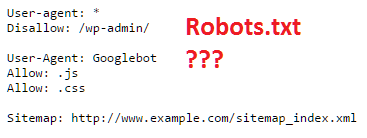
Google Robots.txt Contradiction #1
At around the 28:25 mark, John says specifically that the rule “Allow: .js” which was espoused by Gary would only affect URLs that begin with .js (for example, /.jsSampleURL). To unblock .js files, you’d need to include the wildcard operator (*) such that the rule should be “Allow: *.js”. Interestingly, Gary does mention using the wildcard later in his Stack Overflow comment, but for the “catch-all” rule, he omits it for some reason.
Which format is correct in this case?
Testing This Using Search Console

Luckily for us mere mortals who don’t have regular access to Google’s engineers, Google’s Search Console has a Robots.txt Testing Tool where you can make mock adjustments to your current robots.txt file and test that against specific URLs to see how your changes would affect the site in question.
For this test, I used the example of http://www.example.com/.jsSampleURL and http://www.example.com/sample.js.
Test #1 Rule
Disallow: .js
In this test, Gary seems to believe that http://www.example.com/sample.js will be blocked, while John thinks that you need the wildcard (*) before .js to have this effect. For his part, John said that this rule should block http://www.example.com/.jsSampleURL
Test #1 Winner – NEITHER!

The testing tool showed that *neither* URL was blocked. Thus, both John AND Gary are partially wrong here. Very interesting.
But what happens when you add the wildcard like John said?
Test #2 Rule
Disallow: *.js
Test #2 Winner – John Mueller!
Both URLs are now blocked! The wildcard makes all the difference, just like John said.
Contradiction #2 – Not Really a Contradiction
At around the 27 minute mark, John says that the rule “Allow: *.js” would NOT allow crawling of javascript resources within a previously disallowed subfolder. Rather, John says, you’d have to add the rule “Allow: /blockedsubfolder/*.js”. Presumably, according to John, you’d have to add this for every single blocked subfolder in the file. Originally, when I read Barry’s article, I thought that Gary’s advice said that one simple rule (“Allow: .js) would allow crawling of all javascript resources across the site. This would have created a contradiction between the two Googlers. However, upon reading Gary’s full comment on Stack Overflow, he actually spells out the subfolder issue as well. Still, it is instructive to give an example to show how this works.
Testing Google’s Guidelines Again
For our purposes, I ran two tests by the Search Console testing tool using the sample javascript resource URL http://www.example.com/blockedsubfolder/sample.js
Test #1 Rules
Disallow:/blockedsubfolder/
Allow: *.js
Test #2 Rules
Disallow:/blockedsubfolder/
Allow: /blockedsubfolder/*.js
One might think that Test #1 should allow Google to crawl /blockedsubfolder/sample.js because ALL javascript resources are explicitly allowed. However, according to both Gary and John, Test #1 would NOT allow Google to crawl the resource because the subfolder is a more specific instruction which overrides rule #2. Test #2 is the preferred structure which Google says will indeed allow the resource to be crawled.
Testing Outcome – Google’s Guidelines Confirmed!

As John and Gary said, the testing tool showed that the resource would not be crawlable in Test #1 due to the first rule. However, when adding the subfolder to the second rule, we get the following result:

SEO Takeaways
There are a few things I learned from this experience:
- Make sure to include wildcards when using the method Gary Illyes described.
- Make sure to include separate “Allow” rules for each subfolder that contains the files you are trying to unblock.
Last, and most importantly, robots.txt is a complicated business. Make sure that you have an experienced SEO or web developer looking at these issues for you if you can’t get Google to crawl your site.


Leave a Reply
You must be logged in to post a comment.